Recently I ran into this on a fresh Windows Server 2025 instance on EC2:
“The Secure Boot update failed to update KEK 2023 with error Secure Boot is not enabled on this machine.”
The instance was UEFI, it was Windows Server 2025, and it came from an official Amazon AMI. So why wasn’t Secure Boot on?
UEFI is not Secure Boot#
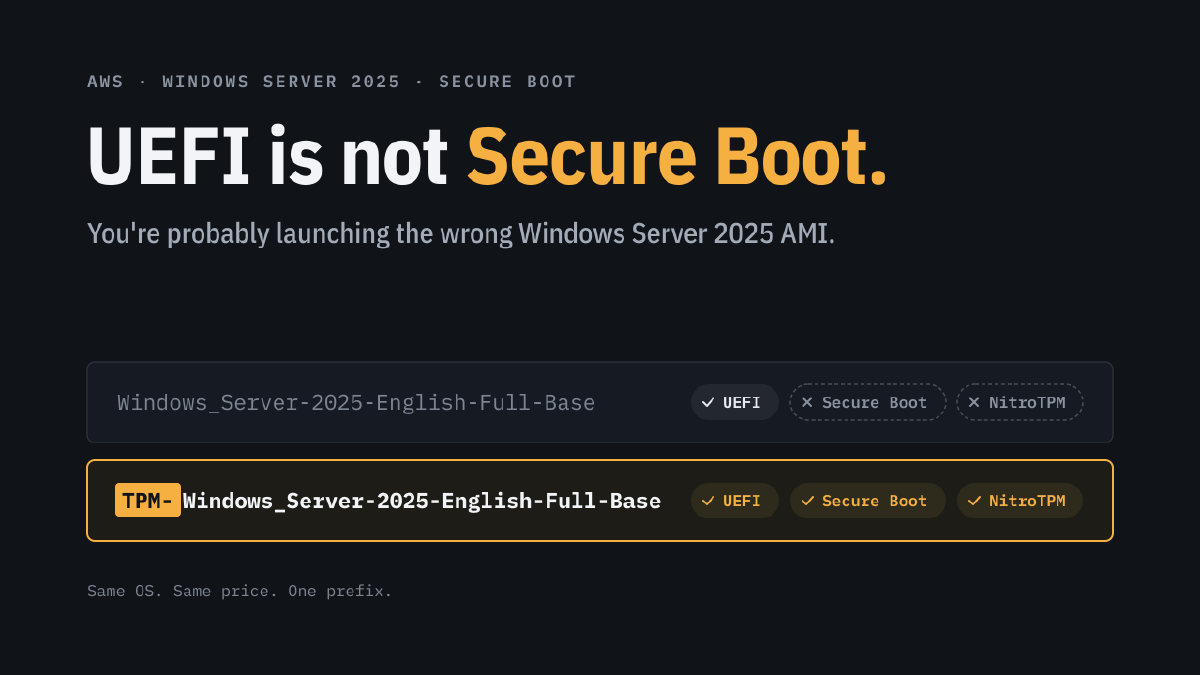
The standard Windows_Server-2025-English-Full-Base AMI boots in UEFI mode by default. A lot of engineers stop there, because UEFI is the prerequisite for Secure Boot, so it feels like the box is ticked.
It isn’t. UEFI is the firmware mode. Secure Boot needs the right keys in the UEFI variable store, and the standard AMI doesn’t ship with them enabled.
AWS publishes a separate family for that: TPM-Windows_Server-*. These images come with NitroTPM enabled, the TPM 2.0 driver installed, and UEFI Secure Boot enabled with Microsoft keys. They cost the same.
Why Secure Boot should be your minimum#
Secure Boot makes sure that only signed, trusted code runs before Windows starts: the firmware, the boot manager, and the OS loader. That closes off the layer where bootkits and rootkits like to live. Malware that loads before the OS can hide from antivirus and EDR, survive reinstalls of applications, and tamper with the kernel before any of your security tooling is running. Without Secure Boot, nothing checks that chain.
It’s also the foundation for other controls. With NitroTPM and Secure Boot, BitLocker can seal its keys to a measured, trusted boot state, and measured boot gives you something to attest against. Most hardening baselines, including the CIS benchmarks and Microsoft’s own security baselines, assume Secure Boot is enabled. If it isn’t, you start every audit with an exception.
Running without it costs you nothing visible today. That’s exactly the problem: the instance boots fine, so nobody notices.
Why so many teams pick the wrong one#
The naming doesn’t help. The differentiator is a prefix (TPM-) instead of a suffix, so you only find it if you already know it exists. The Quick Start in the console, most tutorials, and most Terraform examples online use the plain name, so it gets copied from project to project. And because nothing breaks, the choice is never questioned.
And once it’s on, keep it current#
Secure Boot is only as strong as its certificates and revocation lists. Microsoft is replacing the 2011 Secure Boot certificates, which began expiring in June 2026, with 2023 versions. Machines that don’t get the new certificates keep booting, but they no longer receive updates to the boot chain, including revocations for known-vulnerable boot managers.
On AWS, TPM AMIs dated 2026.02.11 or later already include the new certificates. Older instances can be updated with AWS’s Update-EC2SecureBootCertificate.ps1 script.
Fix it once, in code#
Changing the filter is the easy part:
filter {
  name   = "name"
  values = ["TPM-Windows_Server-2025-English-Full-Base-*"]
}
The better fix is making the wrong choice impossible. Add a postcondition to the data source in your shared module:
lifecycle {
  postcondition {
    condition     = self.tpm_support == "v2.0" && self.boot_mode == "uefi"
    error_message = "AMI ${self.name} has no NitroTPM/Secure Boot. Use a TPM-Windows_Server-* image."
  }
}
Now terraform plan fails before anyone deploys an unprotected VM. That beats a wiki page nobody reads.
Watch your golden images#
If you bake your own AMIs with Packer or Image Builder, start from a TPM- base and make sure the UEFI data survives the copy. One golden image built from the wrong base can quietly spread across your whole estate for years.
Exceptions#
Bare metal instance types don’t support UEFI Secure Boot, and Windows VMs imported with VM Import can’t be imported with Secure Boot. For everything else in an enterprise environment, Secure Boot should be the baseline, and the TPM AMI is the easiest way to get there.
Check your Terraform today. If your filter starts with Windows_Server-2025, you know what to do.