Overview#
This site, my mail server and everything around it run on a single small ARM server. It’s a personal platform, but I run it the way I’d run production at work: everything in Git, secrets out of Git, encrypted at rest, patched automatically, and no tool gets more access than it needs.
That last rule got a lot more interesting once I started using an AI coding agent on it.
Finally practising what I preach#
I’ve worked this way for most of my career. I started as a Microsoft engineer and moved into Linux, bootstrapping machines from code with tools like cloud-init when most teams still installed servers by hand. At a global data center provider I helped deliver the government IaaS underneath most of the Dutch government’s online services, DigiD and MijnOverheid.nl among them, on plain Linux with hand-written iptables and Snort. Then I became a cloud engineer building AWS landing zones from code, and today I build FastAPI automation for identity governance (more about me).
Every step had the same rule: configuration belongs in a repository. That’s not a policy for me, it’s just how I think.
My own server was the exception. Each service lived in its own folder under /opt, set up by hand and tweaked over time. The cobbler’s children have no shoes: I knew it should be in Git, I just never made the time. So I finally did what I wrote about in Get on the bike!, and the whole server is now one repository:
bufon/
|-- traefik/          reverse proxy, routes, redirects
|-- website/          this Hugo site (theme as a Git submodule)
|-- mailcow/          only MY changes to mailcow: an override file and a patch
|-- claude-sandbox/   the AI sandbox (Dockerfile, firewall, compose)
`-- README.md         how to rebuild the server from scratch
Two copies of that repo live on the server:
- A working copy in my home directory, where I edit and commit.
- A deploy copy in
/opt, which the containers run from. It only ever changes throughgit pull.
That split matters. An unfinished edit, mine or the AI’s, never reaches production by accident.
mailcow itself is deliberately not in the repo. It’s someone else’s project with its own update mechanism, so I version only my changes to it, and it stays upgradable the official way.
Secrets never touch Git. Certificates, private keys, the mailcow config with its passwords, and API tokens are all covered by .gitignore rules. I tested those rules with git check-ignore before the first commit, not after.
Traefik as the front door#
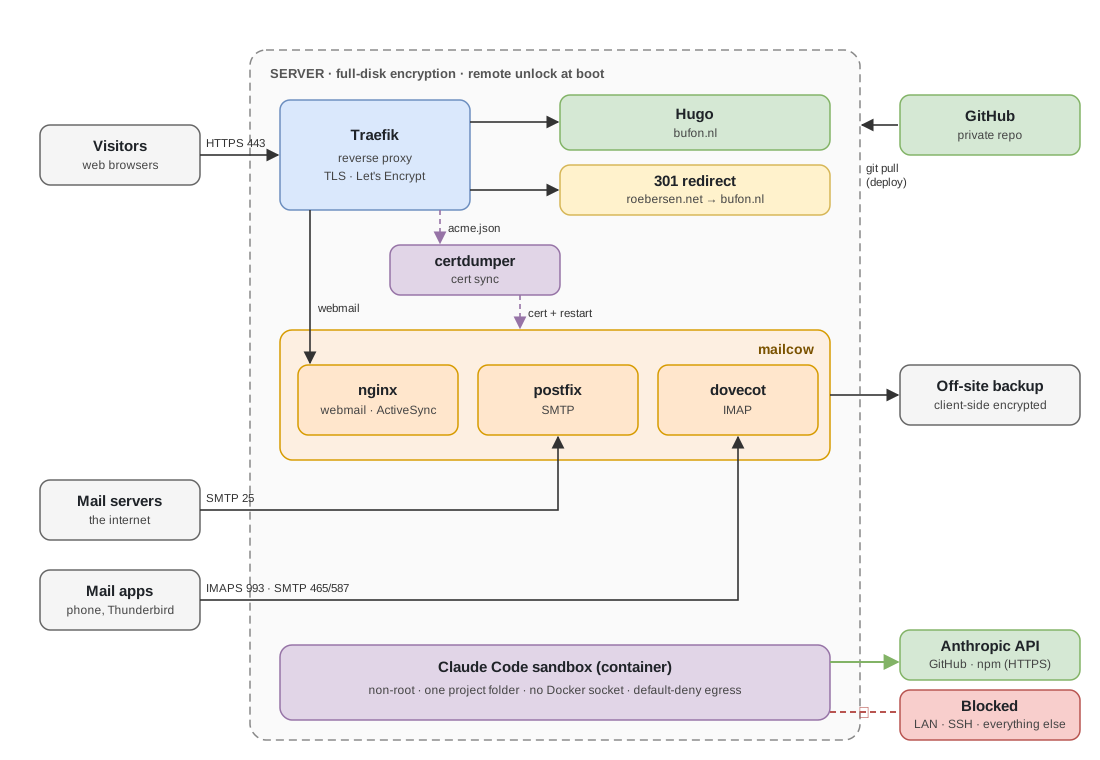
Traefik terminates TLS for everything and gets its certificates from Let’s Encrypt. Websites register themselves through Docker labels; mailcow and redirects are defined in a watched config file.
One fix came almost for free. An old domain was supposed to forward to this site, but its route pointed back at Traefik’s own HTTP port. I’d known it was broken from the start, but it never bothered me enough to dig in, so it stayed on the someday list. Since April it had answered 84,000 requests, and not one of them got a page. With all the config in one repository, fixing it took minutes, and it’s now a proper permanent redirect. When fixing something is cheap, “later” stops being a reasonable answer.
Mail with real certificates#
mailcow runs behind Traefik for webmail, but IMAP and SMTP don’t go through a web proxy. They were still using mailcow’s self-signed certificate, so mail apps warned about it and other mail servers couldn’t verify mine.
The fix is a small helper container that watches Traefik’s certificate store, copies the mail server’s Let’s Encrypt certificate into mailcow whenever it changes, and restarts the mail services. Renewals now flow through automatically: one certificate source, no manual steps.
The host#
- Full disk encryption. The server can’t boot without the passphrase, and I can unlock it remotely after a reboot.
- Automated patching. A scheduled job pulls new images and recreates the containers; OS packages update on their own schedule.
- Encrypted off-site backups. Mail backups are encrypted client-side before they leave the server.
- Monitoring. External uptime checks, and Slack messages for finished backups, available mailcow updates, new vulnerabilities and pull requests waiting for me (more below).
Security posture: measured, not assumed#
“Patched regularly” sounds safe, but it only describes what I do. It doesn’t tell me what’s still exposed. So I added vulnerability scanning with Trivy, Aqua Security’s open-source scanner. No licence, no agent on the host, just a container that reads images.
| Where | What runs | When it speaks up |
|---|---|---|
| Every pull request that changes how something is built or run | Trivy checks Dockerfiles and compose files for misconfigurations and the repo for secrets, then builds the website and sandbox images and scans them | A HIGH or CRITICAL misconfiguration or secret, or a CRITICAL vulnerability that already has a fix. The check fails. |
| On a schedule | Dependabot checks the GitHub Actions and base images | It opens a pull request. Those never merge themselves. |
| Daily | Trivy scans the image of every running container, the mail server and the proxy included | A Slack message for every new CRITICAL vulnerability with a fix, or when the scan itself fails |
A few choices behind that:
- Only what I can act on. A vulnerability without a fix is something to know about. A fix that exists and isn’t deployed is my problem. The daily scan only alerts on new findings, so a quiet Slack channel means nothing changed, not that nothing was checked.
- The scanner is pinned. A security tool that reads every image through the Docker socket is a juicy target. It runs one exact, verified version, not whatever “latest” happens to be that day.
- Upstream stays upstream. I don’t build the mail server’s images, so I don’t patch them myself. The scan tells me when it’s time to update mailcow the official way.
The first scan of the repo found something right away: the nginx container serving this site ran its master process as root. It now uses the official unprivileged nginx image, which runs as an ordinary user on port 8080. Traefik doesn’t care which port it forwards to, and the web server can no longer do anything as root.
Knowing when something waits for me#
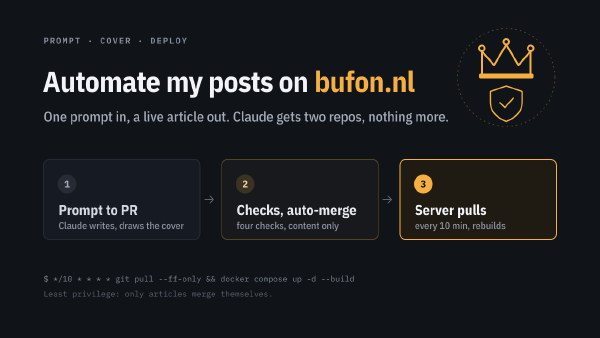
Articles merge themselves once their checks pass (how that works). Everything else, from the proxy and the pipeline to Dependabot’s updates, waits for me. The problem with waiting is that it’s silent. So a small script regularly looks for pull requests that are open with all checks finished, and posts each one to Slack once, with either “all checks passed” or the list of what failed.
Automation that merges on its own needs a clear signal for the moments it won’t.
A firewalled sandbox for Claude Code#
I use Claude Code as a pair engineer on this platform. It’s genuinely useful: it migrated the services into the repo, found that redirect bug, and set up the mail certificates.
But by default an AI agent in your terminal runs as you: your files, your SSH keys, your crontab, and if your account has sudo, the whole machine. Its built-in permission prompts and sandbox mode help, but I wanted a hard boundary. So it now runs in a container:
| Control | What it does |
|---|---|
| One mounted folder | The container only sees the project I’m working on. No home directory, no keys, no /etc. |
| Non-root user | Claude runs as an unprivileged user. sudo is allowed for exactly one thing: the firewall script at startup. |
| No Docker socket | Mounting it would mean root on the host, so it’s never mounted. |
| Default-deny egress | Outbound traffic is dropped unless it goes to the Anthropic API, GitHub or npm over HTTPS. |
| No LAN, no SSH out | The host network and outbound SSH are blocked, which is stricter than the reference setup. |
| IPv6 blocked | So the IPv4 rules can’t be bypassed. |
| Fail closed | If the firewall can’t be set up, the container stops. Claude never starts unprotected. |
The firewall lives in the container’s own network namespace, so it can’t affect the host. Inside the container the rules aren’t even readable without root:
Chain OUTPUT (policy DROP)
 ACCEPT  udp  dpt:53                                  # DNS
 ACCEPT  all  lo                                      # localhost
 ACCEPT  all  state RELATED,ESTABLISHED
 ACCEPT  tcp  dpt:443 match-set allowed-domains dst   # Anthropic, GitHub, npm
 REJECT  all  reject-with icmp-admin-prohibited
A blocked site fails instantly instead of hanging, so it’s obvious when the firewall is what stopped something. Day to day it’s just a few aliases: cs opens Claude in the sandbox, csc continues the last conversation, and csh gives me a shell inside it.
The honest caveat: the project folder is shared. Anything Claude writes there, I could run on the host myself. The sandbox protects the machine from the agent, not from me running code I haven’t read. Review first, then run.
What I took away from this#
- Put it in Git, then look at it. Real bugs showed up the moment the config was in one place and readable.
- Least privilege applies to AI too. An agent is a very fast, very capable user. Give it the access you’d give a new contractor on day one, not your own.
- Measure, don’t assume. A patch run is a process. A scan of what’s actually running is evidence.
- Fail closed. A security control that silently doesn’t start is worse than none, because you think you’re protected.
- Keep upstream upstream. Version your changes to someone else’s software, not the software itself.